
Mine-imator HCl Edition Beta 1.7.0 is out: models from other programs (FBX, OBJ, glTF, MMD, Roblox) and their animations, MMD dances and other animations on any character, toon shading with SDF face shadows, spotlight gobos and video projectors, hand-drawn outlines, motion blur in the preview, better bokeh, FBX export (experimental), mod blocks from .jar files and nearly 30 of your reports and ideas.
- Download (free, Windows 64-bit only): Get it on itch.io
- On 1.6.2 or newer? The program offers the update itself (Settings ▸ Program ▸ Updates).
- Devlog: Read it on itch.io
Important: Minecraft assets now come from your own Minecraft
The download no longer contains Mojang's textures and models. On the first start, HCl Edition builds them from your own Minecraft Java Edition: pick an installed version and press Build (once, a few seconds). They stay on your computer.
- No Minecraft? Install it with the Minecraft Launcher and play the version once, or pick its .jar, or continue without (blocks and characters then show without their textures; you can build later in Settings ▸ Program).
- Updating from 1.6.x keeps your existing assets.
- Mojang's cape textures are no longer included; capes from resource packs still work.
Models from other programs
- File ▸ Import model (also the model library's Browse and drag and drop) now takes FBX, OBJ, glTF/GLB and MMD (PMX/PMD), besides Blockbench. Skinned meshes with bones, morphs, materials and their animations come in as one model; pick which animation when a file has several.
- Roblox avatars exported from Roblox Studio (FBX/OBJ, R15/R6) are recognised and get the right bone names.
- MMD models keep their IK bones (knees bend the right way) and their "append" bones; toon and sphere textures are read.
Animations onto any character
File ▸ Apply animation from file (also the timeline's right-click menu, or drop the file): put an animation from an FBX, glTF or MMD dance (.vmd) onto the selected model, Minecraft characters included. Bones are matched by a humanoid bone map (Mixamo/Unity, MMD, Roblox R15, Minecraft), with an "in place" switch. The result is ordinary keyframes, one undo step.
Toon shading
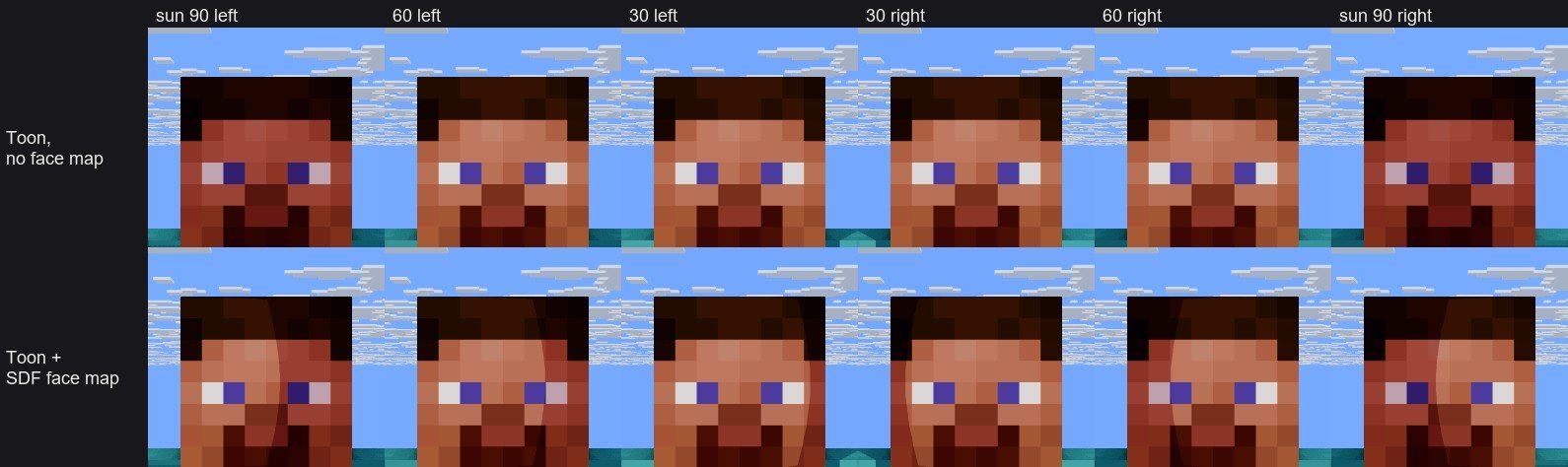
- Material ▸ Shading: Toon — cel bands (steps, threshold, softness), a warm shadow tint or a ramp texture, a hard highlight and an optional rim light. Cast shadows become hard toon shadows too.
- Face shadow map (SDF): the anime-style face shadow. The shadow line moves cleanly across the face as the light goes around the head, in the viewport and the final render.
Spotlight gobos and projectors
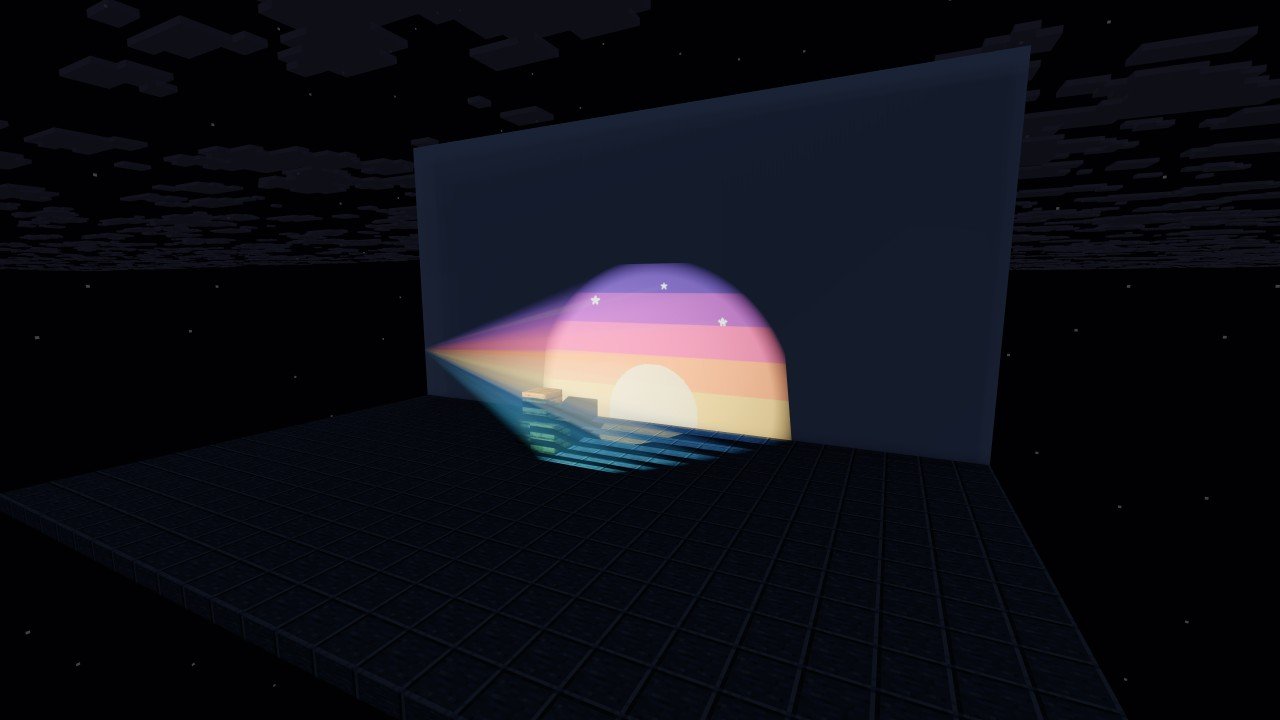
Spot lights get Gobo (light mask): any image or video from Resources is projected through the cone, with keyframeable scale, rotation and offset. Turn on Gobo colors for a full-color projector. Videos play with the timeline, and the light beams show it too.
Hand-drawn outlines
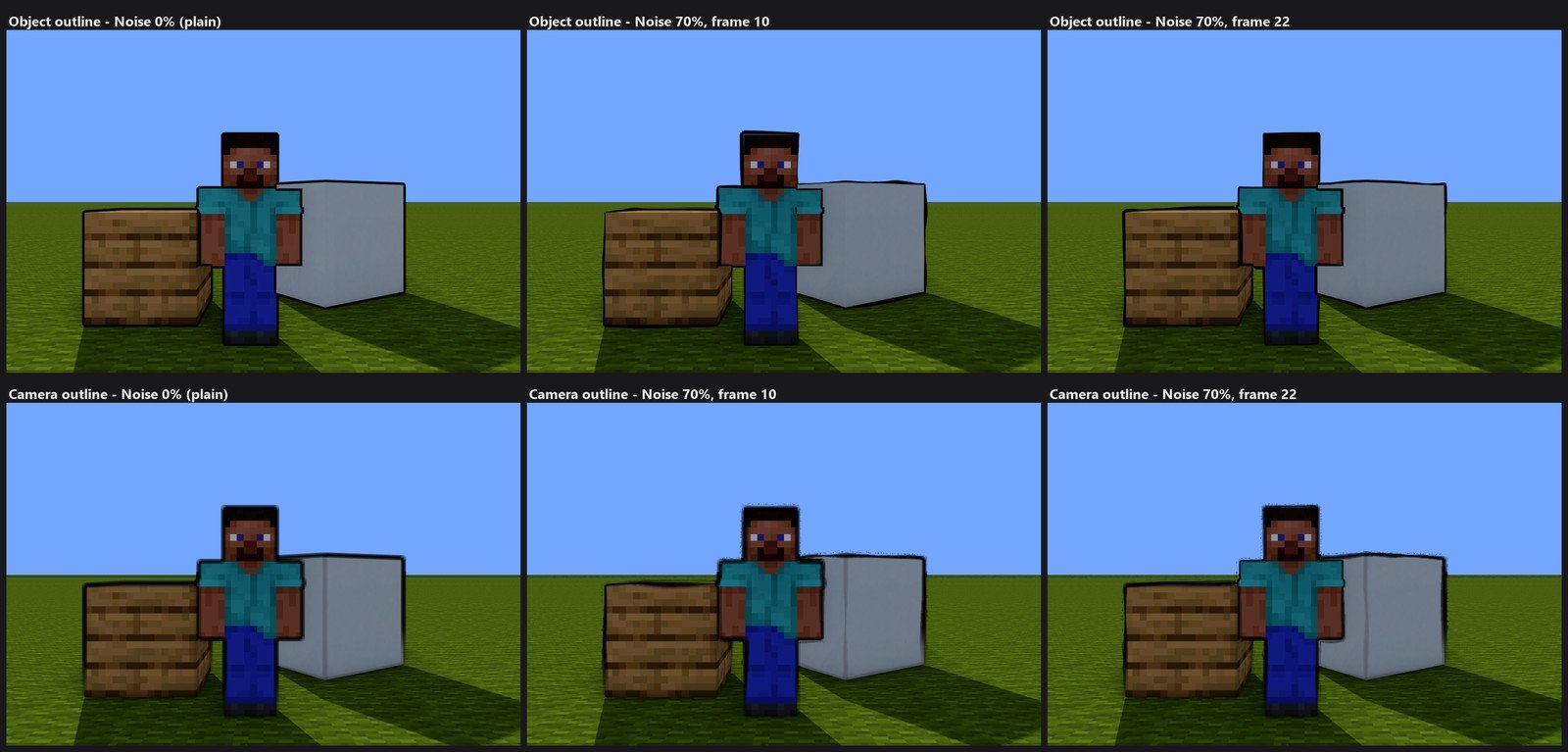
Object and camera outlines get Noise, Noise scale, Noise speed and Boil: a wobbly, boiling line like hand-drawn animation on 2s or 3s. It follows the timeline frame, so renders are repeatable. At 0% everything looks exactly as before.
Videos
- Videos now decode in the background with a frame cache. Dragging the timeline over a 1080p video went from about 4 to about 120 FPS, and a video you no longer use costs nothing.
- Objects with a video texture get Video start, Video playing (pause) and Video speed keyframes in the Material section.
Physics hair and skirts
A spring with "Collide with body" can now leave other springs alone: Collide with other springs, Collision group (springs in the same group don't push each other) and Ignore springs of the same part. Strands hanging side by side no longer shake or flip against each other.
Motion blur and bokeh
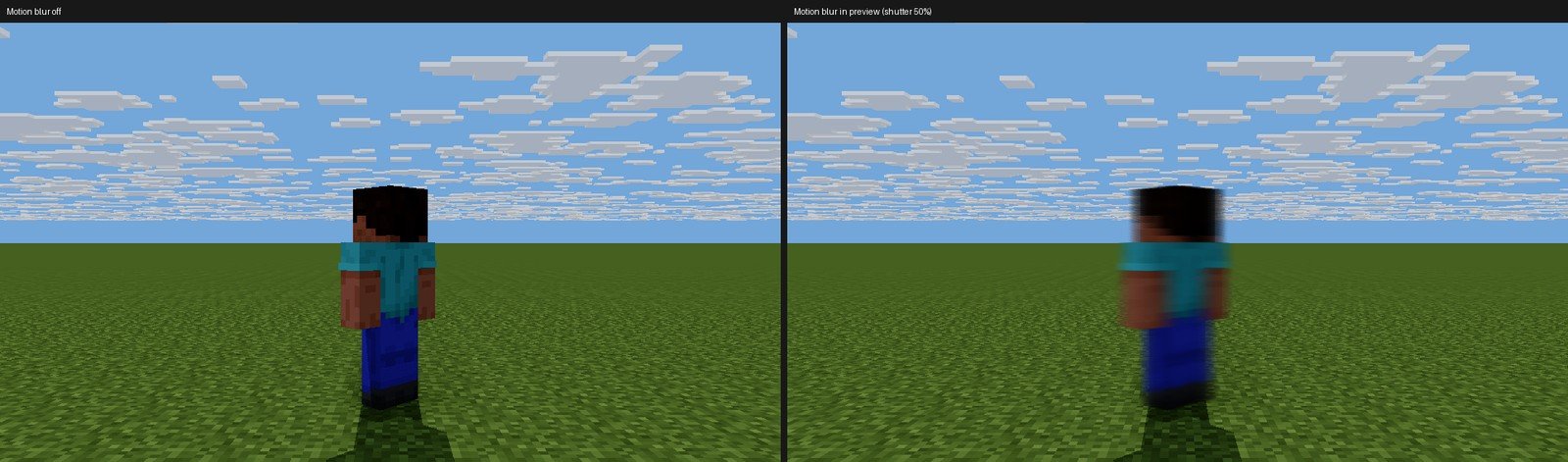
- Motion blur in the preview: the high-quality and camera previews show motion blur while playing and paused (Render settings ▸ Motion blur ▸ Motion blur in preview). Exports keep the accurate method; "Fast motion blur (velocity)" is optional.

- Better bokeh: out-of-focus lights become crisp circle, hexagon or octagon discs (Bokeh shape, Blades, Blade rotation, Bokeh highlights, Cat's eye), in-focus subjects no longer smear onto the blurred background, and the foreground blur is smoother.
More tools
- FBX export (experimental): File ▸ Export model ▸ FBX writes characters as a rigged skeleton with their animation, with optional knee/elbow bend bones and shoulder bones. We could only check the files with our own reader so far, so please tell us how they behave in Blender, Unity, Unreal or Maya.
- Mod blocks: Settings ▸ Program ▸ Mod blocks ▸ Add mod (.jar) imports a mod's blocks with their own models and textures, so modded worlds and schematics show them. No more manual unzipping and no texture limit. Blocks drawn only by the mod's code stay placeholders; connected textures aren't supported yet.
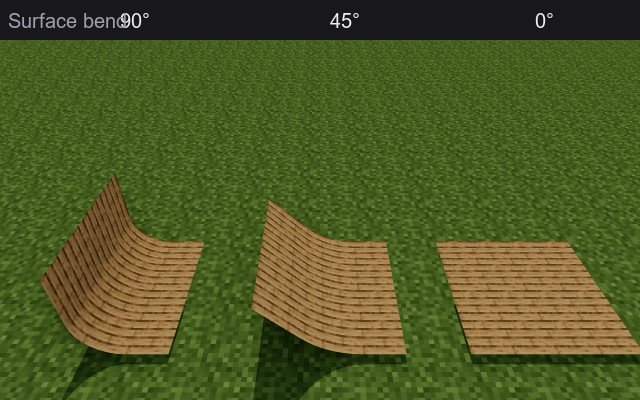
- Bend surfaces: Surface objects get a BEND section (angle, across width or height, position, size, invert, a second bend).
- Paths: path points get their own X/Y/Z size and a Smooth amount, so one path can mix sharp corners and curves; the kink at 45° turns in smooth paths is fixed.
Clearer interface
The Workbench is now Add, Custom model is Model, lengths are in metres and a model's box pieces are cubes (the Cube shape object became Box). Minecraft-only things are grouped under MINECRAFT headings: the Add list, File ▸ Import from Minecraft ▸ World, Library, Resources, Environment, Preferences and render settings. Your projects and keyboard shortcuts are unchanged.
From your reports
- Saving keyframes works for selections with folders; they load onto the folder and every object in it.
- Mouse-wheel zoom in the orthographic view no longer jumps far out and crashes the program.
- The Limit fields: each field is its own, a drag changes one value, and undo goes back one edit.
- Copy and paste keyframes keeps values of 0.
- Cancelling a render no longer moves camera keyframes; a newly added light is selected, so moving it no longer moves the previous one.
- Shift+click selects several IK targets in the viewport.
- The graph editor stays fast when zoomed in, and its channel list no longer covers the curves (Settings ▸ Interface can put it on the right).
- Point and spot lights in the viewport are lit like the render, so they no longer look weak.
- Chains and short grass from maps of older Minecraft versions are recognised again.
- Refresh and Replace of Blockbench and Bedrock model resources rebuild the model from the file, keeping keyframes.
- Sun highlights in the high-quality render sit where they belong.
- Minecraft 26.x worlds no longer open empty in the world import.
- Opening a 1.6.4 project: the crash paths after the map cache question are closed.
- Mesh faces no longer show stripes, and 1.6.4 projects made with the Natural look no longer render grey.
- The interface below 100% scale always redraws.
Also
- New loading screens: two renders by stunerd_ (Respite and Hopeless). Thank you!
- Own vector icons and interface pictures.
- The engine work of the last weeks: playback and rigs evaluate faster.
How to update
- 1.6.2 or later: the program updates itself (Settings ▸ Program ▸ Updates). Your existing Minecraft assets are kept.
- 1.6.1 or earlier: download 1.7.0 from itch once and extract it to a new folder. On 1.6.1 you can also pick the downloaded zip in Settings ▸ Program ▸ Updates ▸ "Update from file...".
Support and The Shadows
HCl Edition is made by one developer and is free for everyone. If it helps your work, please support it on Patreon. It is donation-only: no perks, everything is shared with everyone.
HCl Edition comes from Negentropy, and our main project is The Shadows, a story-driven 2D side-scrolling action game set in 1903. Play the current build free on itch.io!
Bug reports
- Email: report@negentropy.it.kr
- Discord: https://discord.gg/79vtKsDAwM