
Mine-imator HCl Edition Beta 1.6.5 is out, with a Blender-like graph editor, glow that keeps its color, holes for eyes and mouths, background rendering and meshes for rigs. Big maps now load, and the viewport and renders are about 1.6x faster.
- Download (free, Windows 64-bit only): Get it on itch.io
- On 1.6.2 or newer? The program offers the update itself (Settings ▸ Program ▸ Updates).
- Devlog: Read it on itch.io
Glow that keeps its color
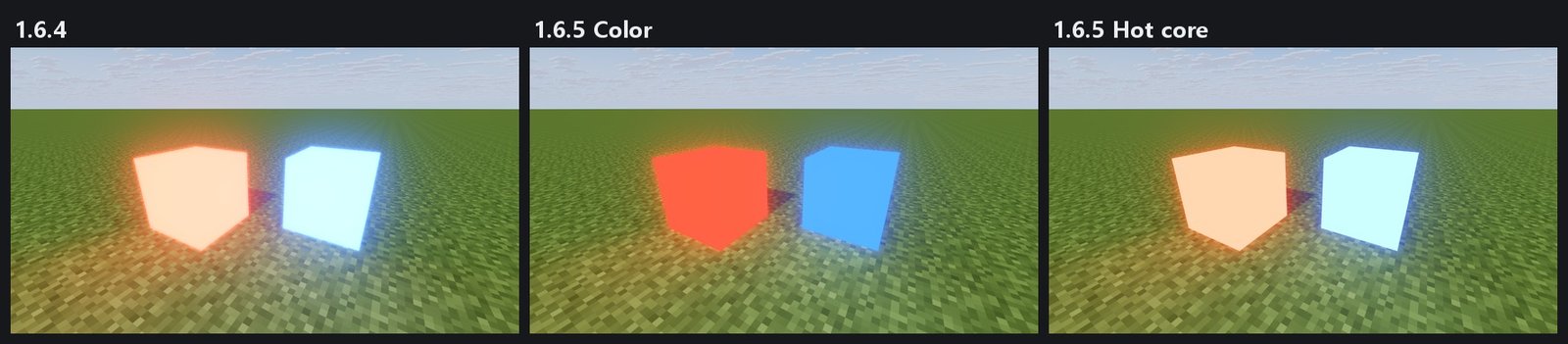
Emissive objects with Glow now bloom like Blender: a crisp edge, a smooth falloff, and no white haze over the ground. Colored glows keep their color: a red cube stays red instead of turning pink, a blue one doesn't turn cyan. Prefer the white-hot look? Turn on Render settings ▸ Glow ▸ Hot core and the faces burn to white like a very bright lamp. The viewport matches the render.
Graph editor like Blender's
- Curves through the keys with handles on both sides (Auto Clamped, Aligned, Free, Vector; V to switch). A curve can dip or overshoot between two keys with the same value.
- Channel list grouped by property, X/Y/Z in red/green/blue, an eye per channel, and a pin: a pinned curve stays in the graph while you select other objects, so you can line up two motions.
- Its own Graph editor panel next to the timeline. Wheel zooms values, Ctrl+wheel zooms frames, middle mouse pans, Home frames all.
- Stretching keyframes stretches their curves; reversing them mirrors the curves.
Cut a hole for eyes and mouths
A Cube object can cut a hole shaped like itself in the part it sits in (and in that part's layers, like the hat of a head). Eye sockets and mouths without the transparency trick, so they no longer depend on draw order. Put eye blocks inside the hole.
Render in background
EXPORT and the render dialogs have Render in background: a snapshot of your project renders in the separate HCl Encoder window, so you can keep working, open another project or close Mine-imator. Queue, preview, time left, Close when done and Low priority.
Meshes for rigs
- Meshes in a body part bend with it. Convert part to mesh turns a part's blocks into one mesh that keeps the skin's UV; Add bend loops; Pixel unwrap into free skin space; Mirror to the other side.
- Mesh edit mode tools: snapping to the skin's pixel grid and to vertices, edges and faces; proportional editing (O); Knife (K); Bisect; Select similar; Join across parts; Separate by loose parts.
Big maps load
Big Minecraft worlds and schematics that used to be refused or crash now load, faster and with far less memory: a 1024x1024 area at full height loads in 12 seconds (it took 47 seconds and 6 GB, and could not be saved), with a progress bar and a Cancel button. If memory runs low, the middle of the map is kept with a warning instead of crashing. Water plants (seagrass, kelp) that some schematics lost are kept now.
Faster viewport and renders
Body parts, blocks, scenery and shapes are drawn in far fewer batches (about 800 draws per frame down to 65 in our 48-character test scene), and work that was repeated in every render pass is done once. That scene went from 7.3 to 4.5 ms per frame, about 1.6x faster, with exactly the same pictures.
New loading screens
The loading screen now also shows renders made in HCl Edition by NorthWing and ChrisLight (Venom fan art), and a throne room by Negentropy, each credited. Thank you for letting us share your work! Want yours there? Post it on our Discord server.
From your reports
- Interface scale for every screen: Settings ▸ Interface ▸ Interface scale is always there now: Automatic or 75% to 300%, sharp at in-between sizes. Too big for your monitor? Pick 75% or 90%.
- No more grey, washed-out pictures: Highlight rolloff now only eases the brightest parts into white (blacks, midtones and colors stay), and works with the None and AgX tonemappers. The Natural look is no longer pale.
- Back faces get light: surfaces and parts that show their back faces are lit from behind like their front, as in Blender.
- Old Mine-imator 1.0.x projects (.mproj) load correctly again, and a model editor crash when changing a mesh's bend is fixed.
Also
- Welcome page: what's new, and Simple / Advanced mode can be switched right there.
- Camera bloom: its Color is shown in Simple mode too.
How to update
- 1.6.2 or later: the program updates itself (Settings ▸ Program ▸ Updates).
- 1.6.1 or earlier: download 1.6.5 from itch once and extract it to a new folder. On 1.6.1 you can also pick the downloaded zip in Settings ▸ Program ▸ Updates ▸ "Update from file...".
Support and The Shadows
HCl Edition is made by one developer and is free for everyone. If it helps your work, please support it on Patreon. It is donation-only: no perks, everything is shared with everyone.
HCl Edition comes from Negentropy, and our main project is The Shadows, a story-driven 2D side-scrolling action game set in 1903. Play the current build free on itch.io!
Bug reports
- Email: report@negentropy.it.kr
- Discord: https://discord.gg/79vtKsDAwM